If you want to ship with Österreichische Post (Post.at), you can easily store your credentials in Shippinglabel. This guide walks you through the integration process step by step using your web service data.
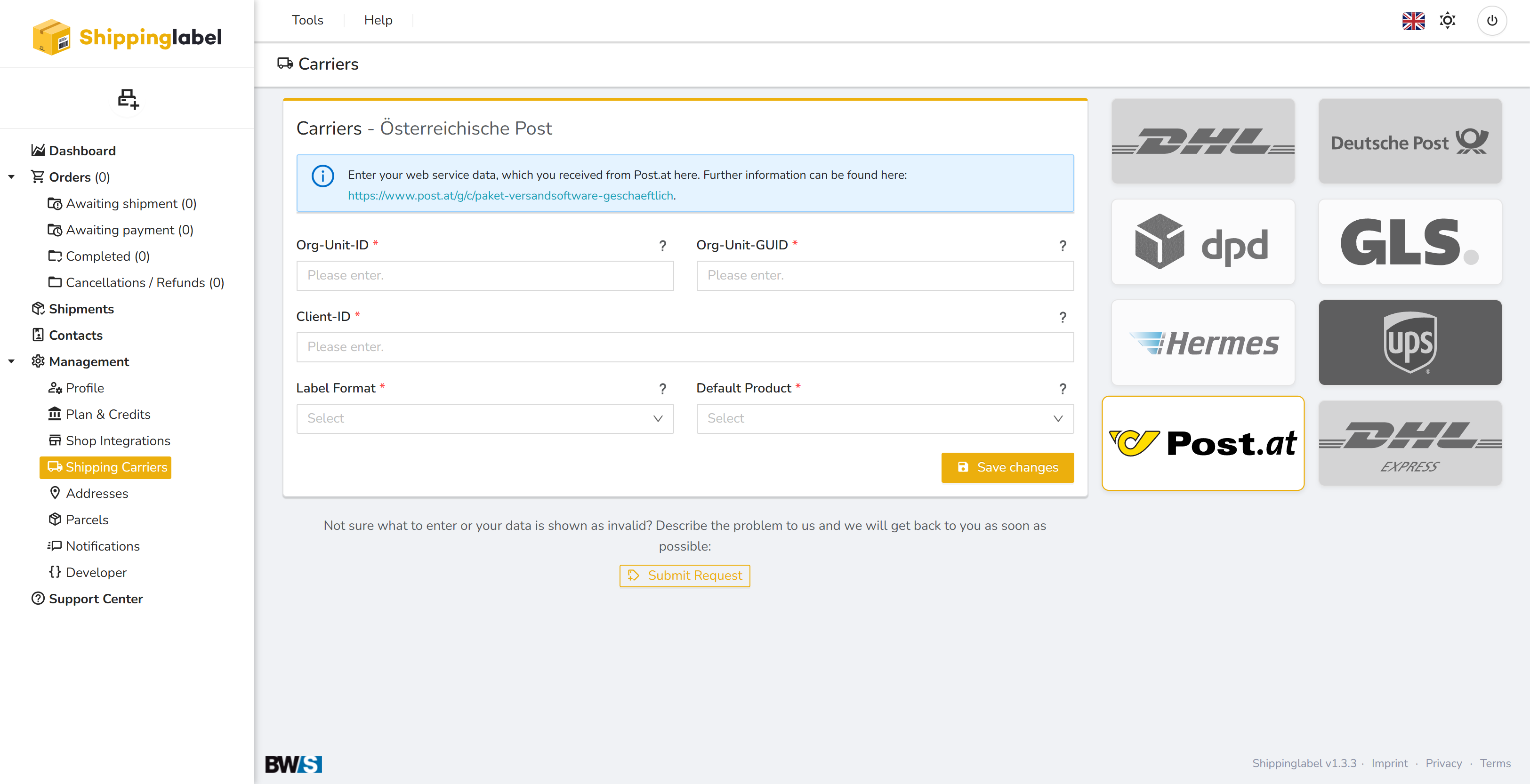
Requirements
Before getting started, make sure that:
- You have an active business account with Österreichische Post
- You have received the required web service credentials directly from Post.at
More details can be found at:
🔗 https://www.post.at/g/paket-versandsoftware-geschaeftlich
You will need the following four credentials:
| Field | Description |
|---|---|
| Org-Unit-ID | Internal ID of your organizational unit |
| Org-Unit-GUID | GUID associated with the organizational unit |
| Client-ID | Your specific API client identifier |
| Label Format | Format used for label printing |
| Default Product | The default product to use for shipments |
📌 Note: If you require a test account, please request one from your Post.at representative.
Step-by-step Setup Guide
1. Open the “Shipping Carriers” section
Log in to Shippinglabel.
Navigate to Management > Shipping Carriers in the left sidebar.
Click the Post.at logo.
2. Enter your credentials
Fill in the required fields:
- Org-Unit-ID – Internal organizational unit ID from Post.at
- Org-Unit-GUID – GUID for your org unit
- Client-ID – Your specific API client ID
🔒 All credentials are stored securely. Previously saved data will be hidden for security reasons.
3. Select the Label Format
Choose the appropriate label format from the dropdown menu, e.g.:
- A5
- A6
- ZPL (for thermal printers)
The format should match your printing system and needs.
4. Select the Default Product
Pick the shipping product you want to use by default, e.g.:
- Paket Österreich
- EMS Inland
- Paket International
5. Test & Save
Click Test connection to verify your credentials.
Then click Save changes to activate the integration.
✅ Summary of Required Fields
| Field | Description |
|---|---|
| Org-Unit-ID | Internal ID of your Post.at organizational unit |
| Org-Unit-GUID | Globally unique identifier for the org unit |
| Client-ID | Technical API client identifier |
| Label Format | Label printing format (e.g., A5, ZPL) |
| Default Product | Default Post.at shipping service |